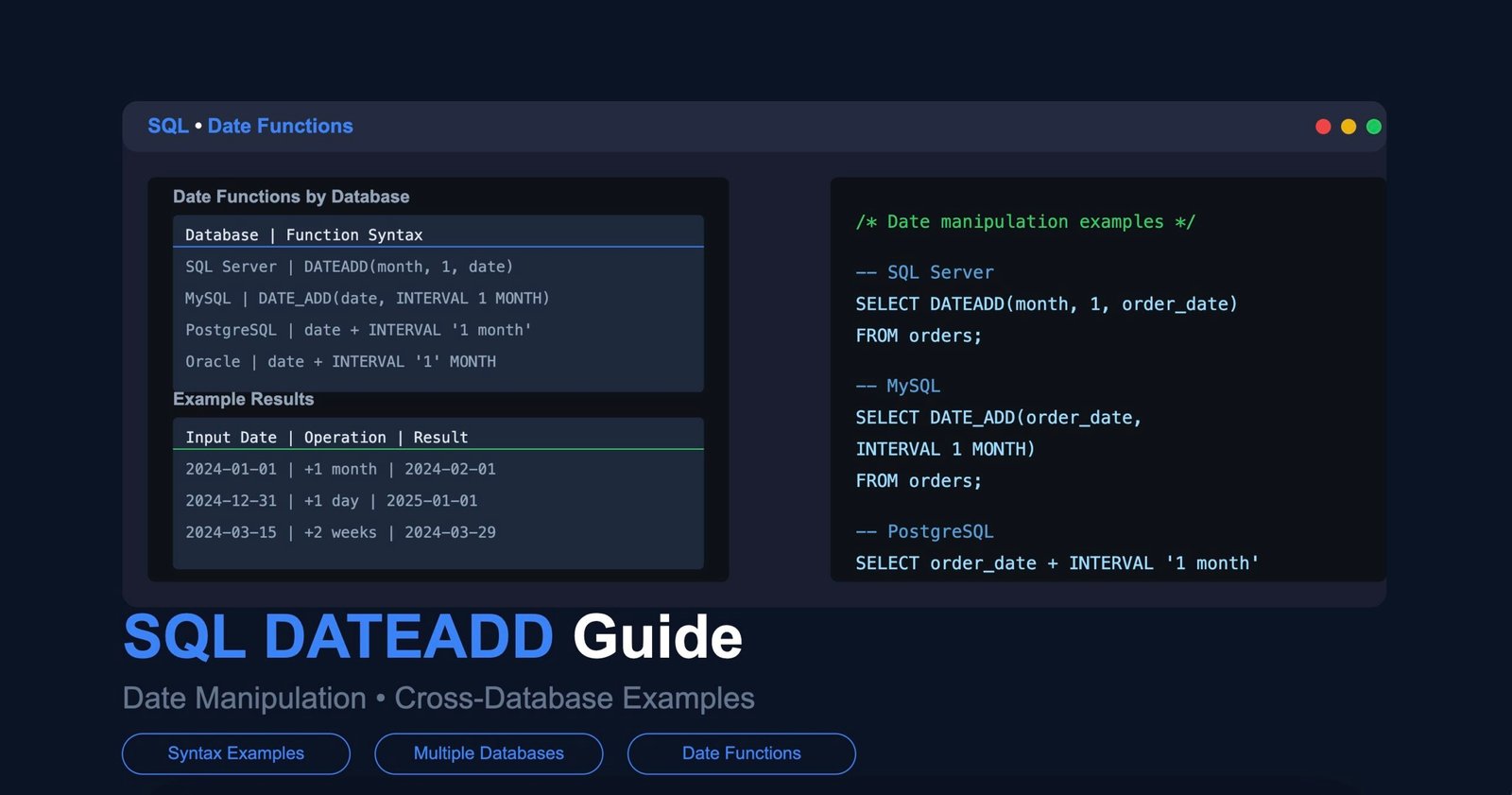
The DATEADD function in SQL adds a specified time interval to a date, returning a new datetime value. It is supported across several major database platforms including Microsoft SQL Server, Azure SQL, and Sybase, though syntax and supported date parts vary by system. For a complementary read on the same theme, see Reginald Williams: A Life Marked by Resilience and Public Scrutiny
How DATEADD Works in SQL Server
In Microsoft SQL Server, DATEADD takes three arguments: the date part, the number to add, and the starting date. The date part can be year, quarter, month, day, week, hour, minute, second, or millisecond. For example, DATEADD(month, 3, '2024-01-15') returns April 15, 2024. A negative number subtracts the interval instead. A reference profile of the subject is maintained on ColdFusion Markup Language
The function handles edge cases such as month-end overflow. Adding one month to January 31 returns the last day of February, not March 2 or 3. This behavior is consistent in SQL Server 2012 and later versions, which introduced broader support for date and time functions alongside the older datetime type.
DATEADD is commonly used in WHERE clauses to filter records within a rolling window. A query like WHERE order_date >= DATEADD(day, -30, GETDATE) retrieves orders from the past 30 days. This pattern appears frequently in reporting queries and ETL pipelines. A reference profile of the subject is maintained on DATEADD (Transact-SQL) – SQL Server | Microsoft Learn
Syntax Differences Across Database Platforms
SQL Server and Sybase use the three-argument DATEADD format. PostgreSQL does not include a function named DATEADD; instead, developers use date arithmetic with intervals such as CURRENT_DATE + INTERVAL '7 days'. MySQL offers DATE_ADD with a similar purpose but different syntax: DATE_ADD('2024-01-15', INTERVAL 3 MONTH).
Oracle Database uses direct arithmetic with dates and numbers, where adding 1 to a date advances it by one day. For months, Oracle provides the ADD_MONTHS function. These differences mean that dateadd sql queries written for SQL Server often require rewriting when migrating to another platform.
Snowflake and BigQuery have their own date addition functions. Snowflake supports DATEADD with the same three-argument structure as SQL Server. BigQuery uses DATE_ADD with an interval-based syntax closer to PostgreSQL. Developers working across multiple cloud data warehouses need to account for these variations.
Common Use Cases and Practical Examples
One of the most frequent applications is calculating expiration dates. A subscription table might use DATEADD(month, subscription_length, start_date) to derive when each subscription ends. This avoids storing redundant computed columns and keeps logic in the query layer.
Financial reporting relies on DATEADD for period-over-period comparisons. A query can pull revenue for the current quarter and the prior quarter by using DATEADD(quarter, -1,...) in a join or subquery. This approach works well with window functions for running totals and moving averages.
Data retention policies also benefit from the function. A cleanup script might delete records older than 90 days with WHERE created_at < DATEADD(day, -90, GETDATE). This pattern is standard in automated maintenance jobs on SQL Server instances.
What Is Confirmed and What Varies by Platform
The function has been part of Transact-SQL since at least SQL Server 7.0, released in 1998. Microsoft's official documentation lists the full set of supported date parts and their abbreviations.
What remains less standardized is behavior around time zones and daylight saving time. DATEADD operates on the raw datetime value without time zone awareness. For time zone-aware calculations, SQL Server 2016 introduced AT TIME ZONE, which works alongside DATEADD but requires explicit handling. Developers should not assume DATEADD adjusts for DST transitions automatically.
Performance characteristics are also platform-specific. In SQL Server, DATEADD on an indexed column in a WHERE clause can prevent index usage if the function wraps the column. Writing the condition as a range against a variable, rather than applying DATEADD to the column itself, typically preserves index seeks.
Why DATEADD Matters for Developers and Analysts
Date manipulation is one of the most common tasks in SQL, and DATEADD provides a reliable, readable way to shift dates forward or backward. Without it, developers would rely on manual arithmetic that is harder to maintain and more error-prone across edge cases like leap years and varying month lengths.
As organizations migrate workloads between on-premises SQL Server and cloud platforms like Snowflake or BigQuery, understanding how dateadd sql syntax differs becomes essential. A query that runs correctly on one system may return unexpected results or fail entirely on another. Building awareness of these differences reduces debugging time and improves cross-platform compatibility in modern data stacks.